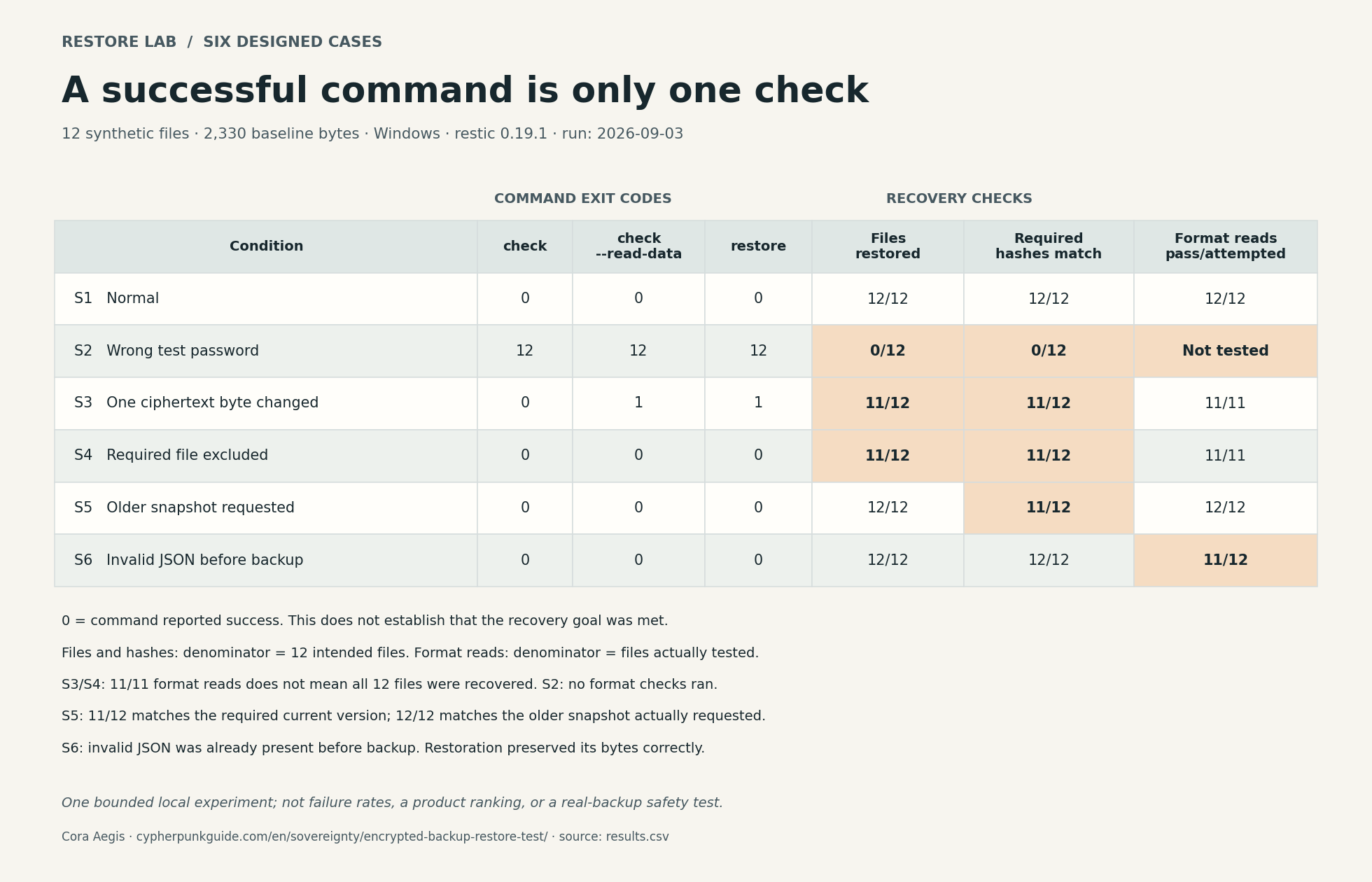

A note on funding (September 2026): CypherpunkGuide carries no surveillance advertising — no ad networks, tracking pixels, or sponsored content. Some articles contain clearly disclosed affiliate links, through which we may earn a commission. This article contains no affiliate links and does not recommend a storage vendor.
Photos, correspondence, and records can outlive the computer that created them. Encrypting a backup helps keep those files private. Recovering them later also depends on access to the backup, a working unlock method, the right saved version, and software that can read the result.
I designed a restoration experiment around 12 artificial files and six test cases, using restic, an open-source encrypted backup program. In one case, the repository check, full data check, and restore command all reported success while only 11 of the 12 intended files came back. In another, all 12 files returned and passed their format checks, but one contained an older revision.
The useful question is therefore specific: can you recover the records you intended to keep, in the version you need, and use them? This guide connects a personal backup plan to a reproducible lab and a safe restore drill. The lab uses generated test files, not anyone’s personal archive. It does not measure drive lifespan, off-site resilience, or recovery of an entire computer.
Separate Sync, Backup, and Long-Term Preservation#
Sync keeps working copies aligned; backup retains copies you can recover; long-term preservation also maintains their meaning and readability as devices and software change. One service may provide several of these functions, but each needs its own check.
A synchronized deletion can be the correct behavior of a sync service. Recoverability depends on its retained versions, deletion rules, and account access. Conversely, a disconnected disk can hold a valuable copy while lacking anything written since it was disconnected. Name the function you need before choosing the storage.
| Function | What it is for | What you still need to establish |
|---|---|---|
| Sync | Keep active files available across devices | Whether deleted or overwritten versions remain recoverable, and for how long |
| Backup | Recover from loss or unwanted changes | Which files and versions are included, whether the copy survives the likely failure, and whether restoration works |
| Long-term preservation | Keep selected records usable over years | Descriptions, formats, readers, media renewal, and a continuing recovery path |
The U.S. Cybersecurity and Infrastructure Security Agency (CISA) describes the 3-2-1 approach as three copies in total, on two different media types, with one off site. Its ransomware guidance also recommends offline, encrypted backups and regular integrity and restoration testing. Off site describes location; offline describes connectivity. A remotely stored copy that the same compromised account can erase does not become independent merely because it is in another building. See the CISA backup guidance and ransomware guide.
For a personal archive, list concrete failures: a stolen laptop, a mistaken deletion, a home fire, an account lockout, or loss of an unlock method. Ask which copy remains usable after each one. This extends the same question used in a personal privacy stack: which failure is each control intended to address?
Keep a Recovery Route Outside the Failed System#
Encryption protects backup contents from someone who lacks a valid unlock method. It does not preserve that method, keep an account accessible, or ensure that all copies remain available. A recovery plan must address these dependencies separately.
Write down the backup location, the program and format used, the account-recovery route if relevant, and how an authorized person obtains the required unlock information. Keep credentials protected. Do not publish them in a worksheet or send them to a chatbot. A note that says “recovery instructions are in the sealed packet” serves a different purpose from exposing the secret itself.
With restic, repository data is encrypted and access is mediated by password-protected keys. A repository can have multiple such keys. Losing one password does not imply permanent loss if another valid key and password remain available. Losing every usable unlock route is a different situation. The official repository-creation documentation explains this model.
Watch for a circular dependency: the only copy of your backup password is inside the backup, or your password manager’s recovery materials exist only on the laptop you are trying to replace. Our guides to passkey recovery and password-manager migration approach the same access problem from the account side.
Self-hosting changes who operates the system; it also leaves you responsible for its recovery. A self-hosted service on the same machine as its only backup still has one machine to lose.
Understand What Each Check Establishes#
A backup check answers the question it was designed to answer. Repository consistency, reading stored data, recovering expected files, matching their bytes, and opening their formats are separate tests. Passing one does not silently pass the others.
As checked on September 3, 2026, the restic documentation distinguishes ordinary check from check --read-data. Ordinary checking examines repository structure and consistency; it does not read and verify all stored pack contents. A pack is a file containing backup data. Adding --read-data reads every pack, which can take substantial time and network traffic. See Working with repositories.
| Check | Useful evidence | What a successful result does not establish |
|---|---|---|
| Ordinary repository check | The repository structures examined are consistent | Every stored data byte was read and verified |
| Full stored-data check | Stored packs passed that tool’s data checks | You included every intended file or chose the right version |
| Expected-file comparison | Restored paths match a separately prepared list | The bytes match or the application can use them |
| Hash comparison | Restored bytes match the chosen reference values | The reference was correct, current, or readable |
| Format/application check | The tested reader can interpret the tested content | Every feature works, every other file works, or future software will support it |
A manifest is a list of expected files, optionally with sizes and hashes. A cryptographic hash, such as SHA-256, is a value calculated from a file’s bytes to help detect change. Keep a protected reference made from the files you actually intend to preserve. A list generated only from the backup cannot reveal a file that never entered that backup. File names can themselves be sensitive, so the manifest belongs within your privacy plan too.
The Library of Congress distinguishes bit-level preservation from preserving future access in its digital-collections glossary. I used the September 2025 archived edition because the live page blocked retrieval during this review. That distinction shaped the experiment below: byte equality is valuable evidence, but an already malformed file can be copied perfectly.
Six Restore Cases, Tested With Artificial Files#
The lab separates command success from the reader’s desired outcome. Under restic 0.19.1 on Windows, checking the repository, reading all its data, and restoring it all succeeded despite a missing intended file or an old revision. Comparison with an independent reference exposed those differences.
I built the corpus before applying any exclusion. It contains 12 files in seven format groups: UTF-8 text, JSON, CSV, XML, ZIP, WAV, and TOML. These are artificial notes, structured records, an archive, and a generated tone. Python’s standard-library readers test their format-level readability; no photo viewer, office suite, or audio-player interface was tested.
Each case uses a selected snapshot ID — the identifier of a saved backup version — and a new, empty restore destination. The run records ordinary checking, full data checking, restoration, expected paths, hashes, and parsing separately. A command exit code of 0 means command success; a nonzero value means an error for that command. Neither is a personal-archive quality score.
Use these six cases as a reproducible exercise in checking a recovery goal. For each case, distinguish a successful command from recovering the required files and versions in readable formats. The exclusion in S4 and the older snapshot in S5 are deliberate choices; restic follows those choices correctly.
Results#
| Case | Ordinary check / full data check / restore | Intended paths restored | Hashes matching the case’s expected version | Format checks passed / files tested |
|---|---|---|---|---|
| S1: unchanged, valid files | 0 / 0 / 0 | 12/12 | 12/12 | 12/12 |
| S2: wrong public test password | 12 / 12 / 12 | 0/12 | 0/12 | Not run; no files restored |
| S3: one byte altered in a disposable repository’s data payload | 0 / 1 / 1 | 11/12 | 11/12 | 11/11 |
| S4: one intended file excluded from backup | 0 / 0 / 0 | 11/12 | 11/12 | 11/11 |
| S5: older snapshot selected | 0 / 0 / 0 | 12/12 | 11/12 | 12/12 |
| S6: malformed JSON present before backup | 0 / 0 / 0 | 12/12 | 12/12 | 11/12 |
Path and hash counts use the 12 intended files as their denominator. Format checks use only the restored files actually tested: a missing file has no restored bytes to parse. Hashes in S5 are compared with the independently recorded required current revision, not with a list taken from the old snapshot. In S6, the reference records the already malformed input so that preserving bytes and reading the format remain separate questions.
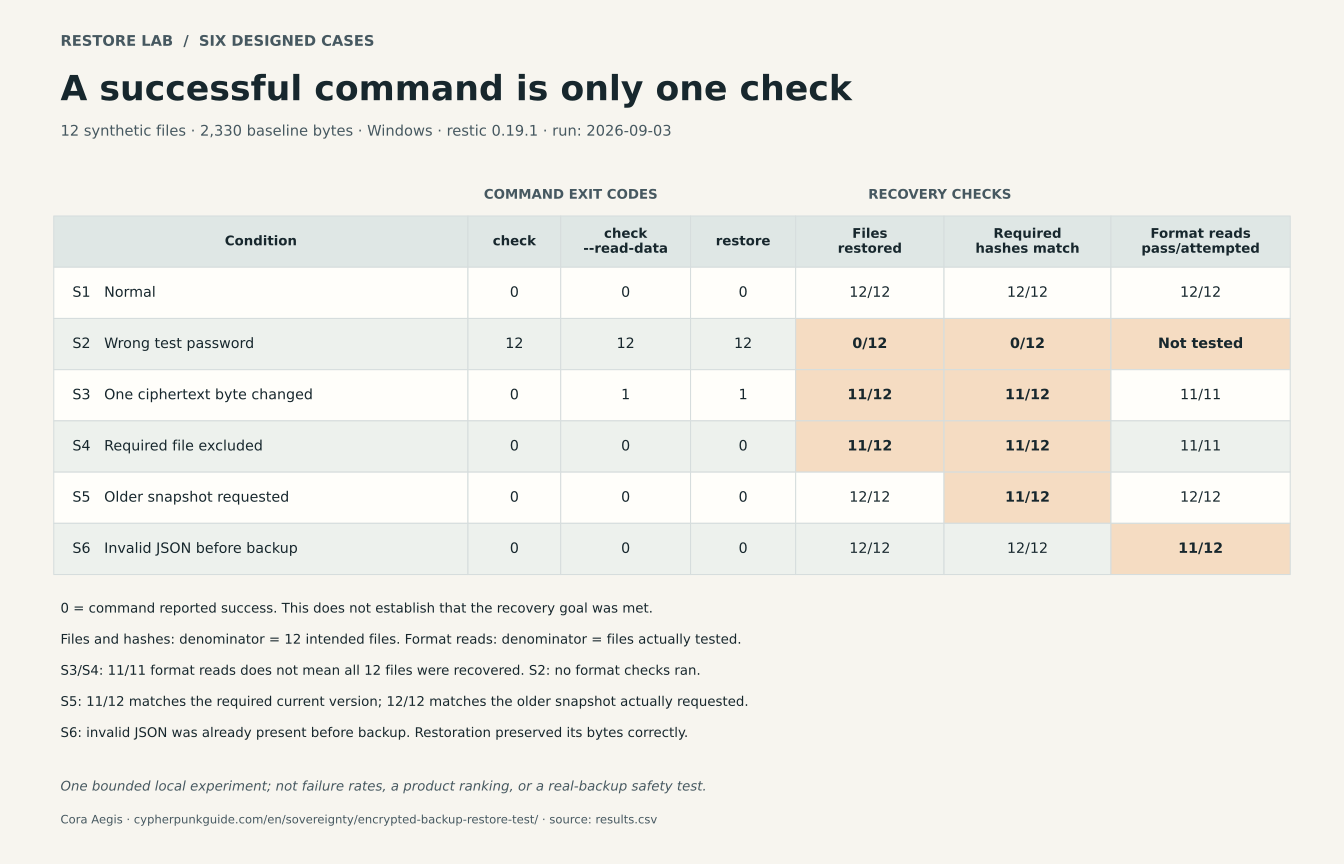
All three restic commands succeed in S4–S6: a deliberately excluded file stays missing, the selected old revision is restored, and malformed source JSON is copied faithfully. The figure uses English labels; the table above gives the counts and denominators.
Download the figure as SVG or PNG; figure source.
What the failures mean#
S2 tests access with one incorrect password. It demonstrates rejection of that test password, not the impossibility of recovery through another valid key. The published password is an obvious synthetic fixture and must never be used for a real backup.
S3 changes actual stored data while retaining the surrounding repository structure. Ordinary checking succeeded; the full data read and restoration detected trouble. That observation is specific to the injected corruption. It does not claim that ordinary checks miss every kind of corruption, or that a damaged real repository always loses exactly one file. I retained the separate command results because collapsing them into a single “backup failed” label would hide the useful difference.
S4 is an inclusion error. The backup program successfully saved the selected files. Our intended inventory also contained documents/contacts.csv, which the experiment deliberately excluded. A program cannot infer that a valid exclusion contradicts your wishes. Review selection and exclusion rules as part of the backup, using the restic backup documentation.
S5 is a version error. The older documents/status.json remained valid JSON and restored correctly. Its hash differed from the required current revision. Neither file counts nor successful parsing establishes freshness. An older snapshot can be exactly what you want after an accidental deletion; it is a problem only when it is the wrong version for your recovery goal.
S6 preserves malformed input faithfully. The experiment deliberately creates invalid documents/records.json before backup. All three restic operations succeed, and all 12 restored hashes match their source references. Yet the JSON reader rejects that file both before and after backup. This is a source-quality problem, not corruption introduced by restoration. The other 11 files pass their format checks.
Reproduce the bounded experiment#
The downloadable experiment script accepts only the pinned official restic 0.19.1 Windows amd64 release ZIP. It checks the archive and executable hashes, creates its own synthetic files and disposable repositories, and refuses existing source or restoration locations. It intentionally damages a copy created inside that experiment. It does not accept your real backup repository.
Inspect the method and limitations, results table, detailed results, synthetic file manifests, and sanitized command log. These assets document generated files only. The command log replaces host-specific identifiers and locations; it is not an untouched terminal transcript.
Run it with Python 3.11 or later in an empty disposable working folder, after reading the script. Download the matching ZIP from the official restic 0.19.1 release and compare it with the release checksums. Then run:
python restore-lab.py --restic-zip restic_0.19.1_windows_amd64.zipTo compare a new lab run with the published record, save the comparison script and the published results in the same working folder. Keep that downloaded results.json unchanged as the reference. After running restore-lab.py above, replace c07-restore-lab-REPLACE-ME below with the test-folder name printed by that run. From the working folder, run:
python .\compare-results.py --results .\c07-restore-lab-REPLACE-ME\results.jsonThe --results argument selects the new run’s record. The comparison checks the recorded outcomes of these six Windows/restic 0.19.1 cases. It does not recalculate file hashes, assess the safety of a real backup, or prove that an independent person reran the experiment. See the method and limitations for details.
The run leaves its test directory in place for inspection. This experiment was executed with Python 3.12.10. It is a mechanism demonstration with one small corpus and defined faults, not a failure-rate estimate or a comparison of backup products. File permissions, entire operating systems, network outages, independent locations, hardware aging, and full application behavior are outside its scope.
Run a Safe Restore Drill on Your Own Backup#
Restore into a new, empty folder and check it before changing any originals. Select the version for the recovery task, compare independently expected files and contents, and open representative files in their intended applications. A small sample provides limited evidence, not a pass for the entire archive.
Restic’s restore documentation warns that restoration overwrites existing files by default. Other programs have their own rules. Read the instructions for your installed version and confirm the destination before starting. Do not point a trial restore at your working documents folder.
- Define the recovery goal. For example: “recover the correspondence and photos up to the last completed backup,” or “recover the version before yesterday’s deletion.” Record which folders and dates should be included. If the source still exists, prepare the expected inventory independently of the backup selection and associate it with the intended version. A working file changed after backup will differ from that snapshot; the difference alone is not restoration damage.
- Confirm access and capacity. Locate the backup and its valid unlock route. Choose a trusted computer and a separate, empty destination with sufficient free space. Restored files may be readable plaintext; protect that destination and keep it out of unintended sync or sharing.
- Select a specific saved version. Record its identifier and relevant date. “Latest” describes an ordering rule; it does not establish that the snapshot contains the changes you expect.
- Run the documented checks and restoration. Distinguish a quick structural check from a complete data read. Review warnings and errors, including those from the original backup job. Do not interpret the existence of a snapshot as proof that every source file was read.
- Compare the result with your goal. Check expected paths, representative contents and versions, and trusted hashes where available. Open documents, inspect photos, play recordings, and try the application features that make those records useful. Record what you tested and what remains untested.
- Keep the working copies until the result is verified. A successful trial does not justify deleting the only other usable copy. Protect or remove the trial files under your own retention policy after verification; avoid destructive cleanup while investigating a mismatch.
Start with a limited selection if time or space prevents a full restore, and record that limit. Expand coverage over time. If the source has already disappeared and no independent inventory exists, say that completeness is unknown; a count from the surviving backup cannot settle it.
Preserve Readability as Well as Storage#
Long-term preservation requires periodic checks of media, connections, readers, formats, and recovery access. A lifespan claim for one storage material does not guarantee that a whole archive will remain recoverable for that period.
The Library of Congress’s personal-records guidance recommends checking saved files at least annually and making new media copies every five years or when needed. Its media-durability note explains why lifetime estimates are uncertain. Treat the schedule as maintenance guidance, not as a promise that a drive will survive until the next date. Recheck after a migration, an unlock-method change, or a suspected failure too.
| Dependency | What to retain or review | Evidence to record |
|---|---|---|
| Storage and connection | Usable media plus access to compatible drives, cables, and interfaces | Date a copy was fully read; detected errors; migration result |
| File meaning and format | Originals, descriptions, and usable export or access copies where appropriate | Which reader opened which files; features lost in conversion |
| Unlock and account access | Protected recovery information and an authorized way to obtain it | A successful recovery exercise without writing secrets into the log |
| Selection and versions | Intended inventory and a retention policy suited to the records | Missing paths, required revisions, and latest verified coverage |
Do not choose a disk by a universal “HDD lasts X years” or “SSD lasts Y years” rule. Likewise, Verbatim’s M-DISC longevity claim concerns an optical-storage product; it does not guarantee future access to a compatible reader, intact unlock information, or readable file formats. The U.S. National Archives describes uncertain lifespans and storage conditions of video media, including optical discs. These limitations do not establish that every optical disc will fail.
Where formats or applications are becoming difficult to use, make a documented access copy while retaining the original. Converting a complex document can lose layout or features; a new hash will also differ because conversion changes bytes. Verify the conversion against what matters in the record, label it, and establish a new reference for the converted copy. Do not overwrite the original to make a folder look tidy.
I compared the cases by recording the intended inventory, required version, and reader checks beside each command result. Use those separate records to decide what to fix. A missing file needs an inclusion review; an old revision needs a version decision; unreadable source material needs preservation work. Buying another disk does not, by itself, answer those questions.
FAQ#
Is cloud sync a backup?#
It can provide some recovery functions if it retains versions and deletions for a suitable period. Check those rules and account-recovery requirements. Synchronization alone does not establish that an unwanted change, deletion, or account loss is recoverable.
Does a successful restic check mean every file is safe?#
No. Ordinary checking does not read every stored pack’s contents. Full data checking still does not establish that your intended files were included, that you chose the required version, or that applications can read the restored files.
Can I recover an encrypted backup if I forget its password?#
It depends on the tool and your remaining unlock routes. Restic can have multiple password-protected keys. Another valid key and password may still work. Do not assume the storage provider can decrypt the backup, or that one failed password proves every recovery route is lost.
How often should I test a personal archive?#
The Library of Congress advises checking saved files at least annually. Use a schedule that reflects how often your important records change, and test after significant storage, software, or recovery-access changes. Record whether you checked a sample or the whole set; neither a calendar date nor a small sample guarantees continued recovery.
Which storage medium will preserve files for decades?#
No medium removes the need for independent copies, inspections, and migration. Consider storage conditions and access to compatible readers as well as the medium. Long-term availability also depends on formats, software, and unlock information. Keep verified originals when creating newer access copies.
Sources and Reproduction Record#
Primary sources were checked on September 3, 2026. The experiment’s results apply to the stated runtime and artificial inputs. Archived editions preserve source history and may predate the live version used for a claim.
| # | Primary source | Original | Archived edition |
|---|---|---|---|
| 1 | CISA — Data Backup Options | 2026-08-05 | |
| 2 | CISA — StopRansomware Guide | Guide | 2026-08-30 |
| 3 | restic — Preparing a New Repository | Documentation | 2026-08-19 |
| 4 | restic — Working With Repositories | Documentation | 2026-08-22 |
| 5 | restic — Restoring From Backup | Documentation | 2026-08-22 |
| 6 | Library of Congress — Digital Collections Management Glossary | Glossary; retrieval blocked | 2025-09-16 |
| 7 | Library of Congress — Personal Digital Records | Guide | 2026-08-28 |
| 8 | Library of Congress — How Long Will Digital Storage Media Last? | 2025-11-07 | |
| 9 | Verbatim — M-DISC Optical Media | Manufacturer statement | 2026-05-02 |
| 10 | U.S. National Archives — Video Condition Assessment | Preservation guidance | 2026-05-15 |
| 11 | restic — Backing Up | Documentation | 2026-08-22 |
| 12 | restic 0.19.1 — Release | Official release | 2026-08-18; release notes, not a binary mirror |